Latest released source code should be accessible on a public GitHub repository. The repository can be accessed here: https://github.com/423s24/Group_5
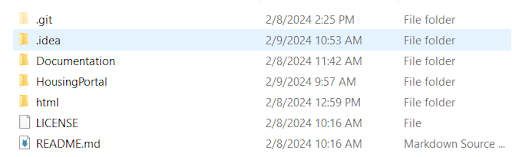
The directory structure will try to follow Django's filing structure. In our main project directory we will have Documentation, README.md, and the following HousingPortal project. Within the project are the application files in Portal, and the general application files in the subdirectory HousingPortal. The Portal folder should be the directory that will contain the files associated with the project i.e. html, css, etc.
To create the database if not done already, run the following command in the terminal: “createdb -h localhost -p 6000 -U postgres -W housingportal”
This command creates the database on port 6000 where the project accesses it correctly, and as user “postgres”, if the user isn’t specified postgresql will attempt to log in as the default user.
This will create the database, now the database needs to be migrated, run “python manage.py migrate” then run “python manage.py makemigrations” and that should set up the database for use. This will create a clean database, and does not include any data entries.
To build the software, you must be in the main folder that contains the manage.py file. In the command line/terminal of the folder that contains manage.py run the following command: “python manage.py runserver”.
If the software properly starts up after following the above instructions, and the database is able to take in and retain information, the software is working properly
Automated tests will run on Github any time a new commit is pushed. This should also be true for any branches made.
Push source code to Github. Newest release can be build with the instructions above. If the steps for building the software changes at any time, the new information will be in the Building the Software section of the documentation.
On the Github page for the project, select the "Issues" tab. A list of opened issues by developers and users can be viewed. Link to page here.
Install PostgreSQL. Setup your database server with user ‘postgres’ and password ‘root’ (sudo -u postgres psql -c "ALTER USER postgres PASSWORD 'root';"). Create the database for the housing portal with the command “createdb -p 6000 -U postgres -W housingportal”. Once the database is created go to the outer HousingPortal folder in a terminal window and type “python manage.py migrate” to create all the tables needed for Django. If you change the model.py file you will need to run “python manage.py makemigrations” and then “python manage.py migrate”.
Go to the outer HousingPortal folder in a terminal window and type “python manage.py runserver”. It will be available in the browser at localhost:8000.
Go to the outer HousingPortal folder in a terminal window and type “python manage.py createsuperuser”. Follow the prompts to create a superuser.
Comment explaining the files relation to the project as well as the function of the file
At minimum 1 comment per function to describe what the function does
etc.